
Ella Kitchens, Editor-In-Chief
As part of Information Technology Services at Denison, the cybersecurity team works to combat attacks against students, faculty and staff.
“We’re a two person cybersecurity team, which is right about the average for schools of our size,” said Jared Hoffman, senior director of cybersecurity.
Hoffman’s role involves reducing vulnerabilities, finding ways to improve controls, and looking around for threats.
“Threat hunting is a good word for that,” said Hoffman. “We look for threats. We also look for ways to improve our controls, improve our capabilities, and to find ways to make security easier for everyone.”
“We try to create solutions that are both secure and usable,” added Sejin Kim, cybersecurity engineer. “If something is not usable, then people are going to work around it to do the work they need to do. And that defeats the purpose of it.”
Currently, Denison is transitioning from Banner software to Workday, a cloud-based platform, in a university-wide change that has been occurring for the past several years. The cybersecurity team has implemented security improvements and features alongside that change.
“An example of a security improvement is you can no longer set a password that’s been exposed in a data breach,” said Hoffman.
“A feature is that the new service is more reliable,” said Kim. “We work with the vendor who helps us make sure that it’s always available.”
Another change that occurred as Denison switched to Workday was a switch to a single single on (SSO) for anyone with a Denison account. SSO is “a service that provides a unified log in experience for all the different services you log into,” according to Hoffman.
“There are components that have to be updated and upgraded. And that was one of them. We had to update to a new SSO service in order to meet the needs of Workday,” said Hoffman. “We knew with the Workday project that it had to change.”
Another change that the cybersecurity team has implemented is a change in Denison’s Duo multi-factor authentication to include a code that needs to be typed in, rather than just clicking yes or no when logging in.
“Part of the reason we had to do this was that attackers were targeting Denison users to accept fraudulent Duo requests,” said Kim. “This includes faculty, staff, students as well.”
Denisonians faced what is often called “fatigue attacks.”
“Let’s say it’s 2 a.m.,” said Kim. “You’re in bed, you just want to go to sleep, and your phone keeps buzzing. ‘Are you logging in? Are you logging in?’ And every time you tap no, it just keeps going off. And so eventually, you just tap yes to make it go away.”
In this type of attack, the attacker already has the individual’s password, and is at the last step of needing verification before they are logged into the account. Kim and Hoffman saw an increase in this type of attack.
“We had a significant rise,” said Hoffman. “We had dozens within days after the school year was over.”
Since then, they changed Duo to a code shown on the account holder’s phone that must be typed on the device logging in.
“You don’t know who’s requesting it, so you can’t send it to them,” said Kim.
One way that attackers can access accounts is through password breaches or password reuse, where they gain access to individuals’ passwords without interacting with them. But another method involves social engineering.
“With social engineering, they’re targeting a person or a populace and to get them to provide their information,” said Hoffman. Social engineering through email is called “phishing.”
“It’s not just us,” said Kim. “The whole education sector has been experiencing an increase in phishing.”
In December, the cybersecurity team sent out a phishing email simulation to students demonstrating how to report phishing through “Is It Safe.” On their Denison email account, if students see an email or message that appears to be potentially unsafe, they can forward the email to isitsafe@denison.edu. After the email is forwarded, the cybersecurity team will send students a message about whether it is safe, spam, or malicious.
“[The simulation] was not a ‘trick you’ message, this was importantly how to report something to be sure,” said Hoffman. “We do not expect people to know if every message is safe or not. We want them to be aware of warning signs and know how to report a message to be sure.”
Denison sees over a million email attacks per year.
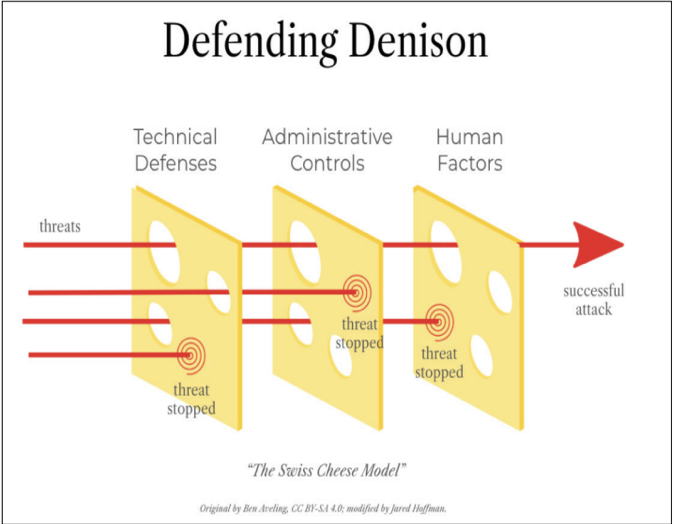
“A majority are blocked by our email security tools, but not everything can be blocked,” said Hoffman. “There’s [attacks] that are more gray, questionable. And so some of those do get through because there’s a balance to play between managing your false positives and your actual positives.”
Another issue that the cybersecurity team faces is the inability to stop phishing messages from going to a student’s personal inbox.
“If a malicious sender sends a malicious email to a Denison student’s personal email, we have no visibility of that,” said Kim. “We know that it happens because we get reports from students who do alert us, let us know, and unfortunately from students who have fallen victim.”
One of the most common attacks that Kim and Hoffman see is a “professor attack.” This type of attack occurs when an attacker sends an email from an address that, at a glance, looks like the email of a Denison professor. Rather than being sent from a Denison email address, though, the email address will look like “professor name denison.edu @ gmail.com.”
“The attackers are able to correlate that data,” said Hoffman. “There’s so much data on us out there.”
These attackers will frequently send emails to students offering links to jobs or opportunities that seem legitimate at a first glance.
“If you get a job offer, you should never be asked to pay,” said Kim. “There’s no company that will ever ask you to pay a $150 application fee.”
Kim and Hoffman recommended that any student who receives a job offer from a professor through a gmail account should email the professor back at their Denison email address to make sure the offer is legitimate.
“They take advantage of our good faith,” said Hoffman. “And none of this is just about students. They will target anyone.”
Kim provided a list of things students can do to personally combat cyberattacks.
1. Is it really that urgent? Stop and verify anything that seems potentially suspicious.
2. Never approve or provide a multi-factor code that you did not request.
3. Always use strong and unique passwords.
4. Never share your passwords.
5. If you get something suspicious, report to “Is It Safe.”
6. Always keep your device up to date with updates.
“All of the things that you’ve seen happen so far over the last year or last two years, this is based on our adapting as threats evolve,” said Kim. “We do a lot of stuff that we hope you don’t see, because that means that it worked.”